Thursday, October 26, 2017

Big Day on the 2-M EME Project

Wheeeeee!  Big-Time progress was made today.  I did some minor work on the antennas by covering the driven element screws with Coax-Seal, putting some Silica Gel packets in the T/R Relay - LNA box to keep down the condensation, taping some of the control lines together, and making a small re-alignment of the rearward boom.  

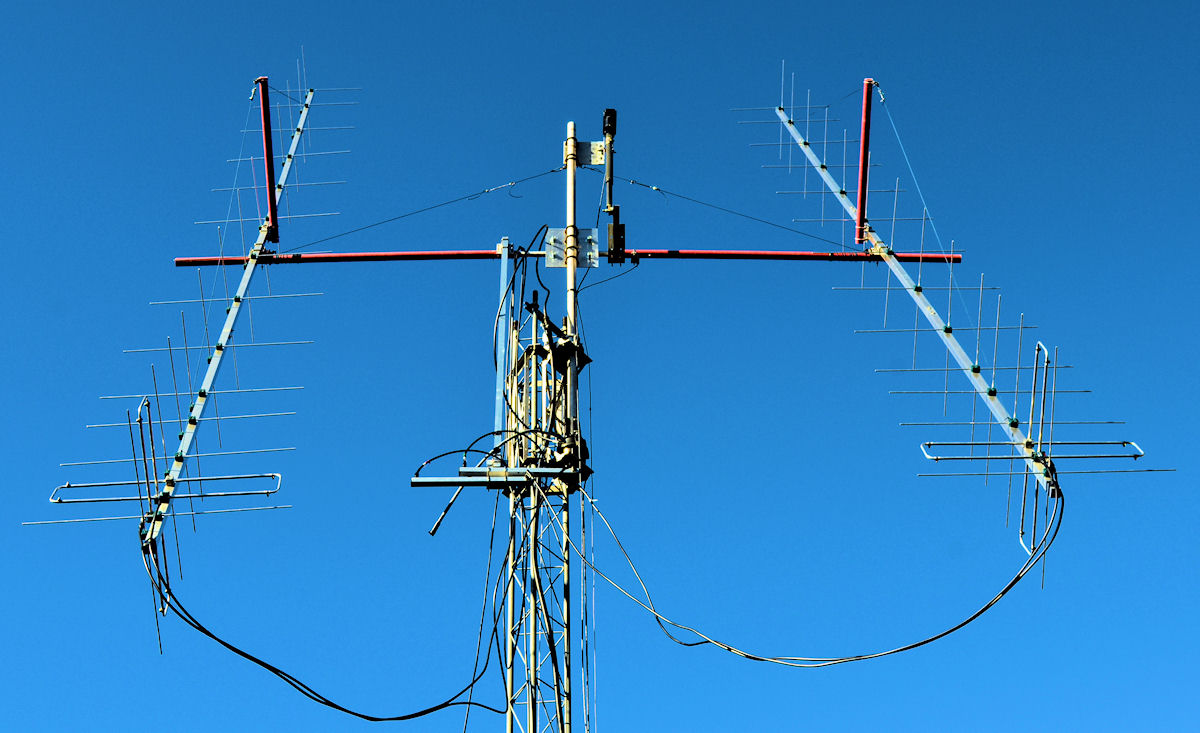
The next step was to see how far off my rotor indicators were from where they should be.  I had a good visual on the moon so I had Evelyn use the Rain Proof Hoist Crane Pendant to move the antennas as I stood out in the yard to visually align them with the moon.  Once we had the moon square in the sights of the antennas, I went inside and looked at where the MoonSked program said the moon really was in Azimuth and Elevation from my QTH, and compared that to what the rotors indicated on the EA4TX ARS-USB rotor controller.  I then repeated that same operation four more times over the next hour or two.  As it turned out, my Azimuth reading was consistently 7° greater than what it should be and my Elevation reading was 5° less than what it should be.  Here is what the antennas looked like when we had the pointing "nailed."  Note that in the photo below you can see the moon lined up with the left-hand antenna. (Click on any photo to see a larger image.)

Now here is where things got GOOD!  I have a "driver" program that interfaces between MoonSked and the EA4TX ARS-USB unit and in looking at it, there is a "Setup" button.  When I opened the setup screen, there were two adjustments to "compensate" the readings between the two.  I inserted a +7° in the Azimuth box and -5° in Elevation box and told the driver program to "AutoTrack" the moon.  It adjusted the rotors to exactly where they "should" be pointing and I ran out in the yard to see that BINGO! - the antennas were indeed pointed right at the Lunar Orb!  WHEEEEE!  This is HUGE for my project to have the antennas actually pointing at the moon consistently and the AutoTrack feature working to keep them pointed there regardless of whether or not I can see the moon!

After that, I began running WSJT 10.0 as well as the MAP65 program while the AutoTrack kept my antennas pointed at the moon.  After about an hour, I saw on the WSJT EME - 1 chat page that K9MRI was calling CQ on 144.149 MHz.  I put my K3S on that frequency and WHAM! - the WSJT 10.0 program copied his CQ!  At 2309 GMT I copied his first CQ and then at 2313 I copied him with the best signal strength of -18 dB:

231300  6  -18  2.9 -283  3 *      CQ K9MRI EN70             1  10

K9MRI is running 8-M2 XP28 Yagi's and 1 kW.  So, he has a pretty big signal.  However, it is interesting to note that at 2300 GMT, the Degradation is 5.8 dB so not the best of conditions.  That probably explains why I was not able to copy the two or three 2-yagi stations that K9MRI worked over the next hour or so.  Still, I'm totally PUMPED that my receive is doing as well as it is.

But, I noticed that while I could copy K9MRI just fine on WSJT 10.0, I had zero copy on MAP65.  I began looking to see what could be causing that program to not receive and realized that when I had selected the Audio Source (which was for the FUNcub Dongle Pro+ SDR Thumb Drive) I had chosen the DirectX audio stream.  There was also an MME audio stream so I selected that instead and a few minutes later, MAP65 copied K9MRI - SUCCESS!

Now as I sat at the computer, I could see both WSJT 10.0 and MAP65 copying the signals off the moon.  This is AWESOME!!!  One reason I was trying to get the MAP65 program running is that it basically works like CW Skimmer in that it listens to 60 kHz of the 2-M band all at once and copies EVERY station it hears.  It prints out the messages that those stations are sending along with the frequency they are transmitting on, the audio frequency offset and the signal strength!  Since I was only able to copy one station tonight, here on the right is the "Messages" window of MAP65 showing the signals I actually copied!

The color code gives the most recent messages in Red, older ones in Yellow and the oldest in Gray.  All I need now is to have a little better conditions so I can hear more stations to see just how valuable this MAP65 program will be to me.

I can't wait for conditions to get better.  And, I am really, really close to being able to transmit.  I have the TX feedline connected, the wiring of the amplifier power supply is nearly complete, and there is not too much I still need to do to finish off this project.  If nothing gets in my way, it should just be a few days until I can echo test.

NEWS FLASH!!!  -  As I was typing this, the screen I was typing on was covering the MAP65 screen.  I just took a look and WOW, I had copied another station off the moon:

149 -151 0 0110 2.6 -26 # CQ K5LA DM61 0 23 0

I actually copied two CQ's from K5LA and this was the strongest one.  K5LA runs four 9-element yagis and is located in El Paso, TX.

Finally, on the left is a shot of the antenna array.  You can see the feedlines from the back of each antenna connecting to the power divider, which then connects to the T/R Relay - LNA box on the rearward boom, and inside that PVC box is the T/R Relay and the LNA (preamp.)

Lots of work has gone into this setup and it's about time for it to pay off!  Right now the moon is down to under 14° Elevation so it's time to shut things down and hit the sack.  I took a look out the front door and the moon is beautifully hanging over Hurricane.  Maybe I'll keep the station listening for a little longer just in case a VK, ZL or JA shows up [grin].

P.S.  A ZL did indeed show up on the Chat page but my noise had jumped up to S-9 so there was no chance for me to copy him.   Another time - I will!

Monday, October 16, 2017

Connecting the TX Inhibit Circuit to the K3S

In order for the TX Inhibit circuit which I built into the Sequencer (See HERE) to work with the Elecraft K3S, I needed to wire a couple of connections from the Sequencer to the K3S ACC jack and change some Menu Settings on the K3S. Since I already have other accessories connected to that jack, I purchased a DB15HD "Y" cable as well as a DB-15 Male Breakout Board.  The "Y" cable was connected to the K3S ACC jack, my other accessories were connected to one branch of the "Y" and the other branch was connected to the breakout board.  You can see the breakout board in the photo below with a 2-conductor shielded cable which connects Pin 7 (TX Inhibit line) and Pin 13 (BANDØ line) to the Sequencer.

DB-15 Male Breakout Board
The K3S has several Band Outputs which will produce either a Ø or a 1 condition with Ø being when the line is pulled to ground (Ø V) and the 1 being when the line is floating at 5 V.  These Ø and 1 outputs can be used to control many things.  In order for these Band Outputs to be used to control the TX Inhibit circuit, some settings in the K3S need to be adjusted.  First,

CONFIG:KIO3B is set to TRN.  This sets the BANDØ-3 outputs to reflect the parameters of the CONFIG:XVn ADR menu entry.  There is a chart in the manual that shows which conditions will be produced by different Transverter Addresses.  I chose the TRN setting for the CONFIG:KIO3B menu item instead of HF-TRN because using the latter would give me a 1 output on various HF bands in addition to 2-M.  Using the TRN setting, I only get a 1 output on BANDØ when the K3S is tuned to the 2-M band.  That is where I need to enable the TX Inhibit line.

As I'm using the Internal 2-M Transverter in the K3S, it is delineated as Transverter 1 (TRN1) and therefore, I set CONFIG:XV1 ADR to Int. trn1.  This causes the radio to output a 1 on BANDØ when the K3S' VFO A is tuned to 2-M.  With the above settings, I will ONLY see a 1 on the BANDØ output line when the radio's A VFO is tuned to 2-M and not on any other bands.

To make sure I really understood all this, I connected the lines from the Breakout Board to the sequencer with clip leads and a volt-meter.   When I would change bands I could see the 5VDC output vary according to where the CONFIG:KIO3B menu item was set.  Watching the output on BANDØ allowed me to also test the TRN and the HF-TRN settings as well.  Once I had that figured out, I used a clip lead to put the sequencer into transmit and could see that my circuit (KL7UW's circuit) was functioning properly.

The Sequencer contains a 5 VDC power supply which I built from a circuit I found by KL7UW and that voltage is used to control the K3S' TX Inhibit line.  From the K3S manual: "Pin 7 of the ACC connector can be configured as a transmit inhibit input by setting CONFIG:TX INH to LO=Inh (or HI=Inh). Holding pin 7 low (or high) will then prevent transmit."  Putting the TX INH setting to HI = Inh will tell the K3S to NOT go into transmit if there is a 5 V signal on that line.  The KL7UW circuit connects to Pin 13 (BANDØ) to determine when the K3S is tuned to 2-M.  If that line is HI (5 V) then the circuit turns on a transistor which then pulls in a relay.  That relay connects the 5 VDC power supply I built in the Sequencer to Pin 7 (TX Inhibit) to prevent the K3S from transmitting.

To make this work, I had to set the CONFIG:TX INH menu setting in the K3S to HI = Inh so that a HI (5 VDC) voltage on Pin 7 will prevent the K3S from transmitting.  When there is a HI (5 VDC) voltage on Pin 7 of the K3S, the front panel of the K3S indicates this by flashing the TX indicator.

The whole purpose of this TX Inhibit circuit configuration is to make sure that the K3S will NOT transmit any signal until the T/R Relay has completely switched to the XMIT position.  Stage 4 of the Sequencer connects internally within the Sequencer box to the KL7UW circuit so that it shorts out the 5 VDC supply that is connected to Pin 7.  That places a LOW (0 V) on Pin 7 and the K3S can now transmit.  But this ONLY takes place after power is removed from the LNA and the CX-600NL relay, the T/R relay is de-energized to place it on the TX position, and the Amplifier PTT circuit is closed.  ONLY then can the K3S produce a signal.  This is a safety circuit to keep the system from accidentally transmitting when it shouldn't. 

One more piece of the puzzle is now complete.  I am down to needing to install one connector on the TX feedline (7/8-inch Heliax), finish the amplifier power supply, and a couple of other minor items and I'll be ready to transmit!!!

Sunday, October 8, 2017

Another Great Night of Listening to EME Signals

EME conditions on 2-M were not really optimum tonight.  The degradation was -2.6 dB which meant there was some room for improvement.  Still, it was the ARRL EME Contest weekend and I expected there would be a lot of activity, but the weather forecast called for rain and I felt that if I could not see the moon to align the antennas, it would not be worth the effort to get up in the middle of the night!

I woke up just after 0730 GMT and saw moonlight outside so I thought "Hey, I can visually aim the antennas!"  Therefore I got dressed, fired up the station, rotated the antennas to where they should be pointing at the moon, and went outside to see how far off the antennas were.  However, the clouds had rolled in and I could not see the moon!  Bummer!  So, I started listening to the moon anyway about 0750 GMT since everything was turned on and hoped I could get the antennas close.

At 0819 GMT I copied K9MRI at -24 dB (K9MRI runs EIGHT M2 XP28 yagis and a kW) calling RI1F on 144.108 MHz. 

FileID Sync dB   DT  DF   W
081900  4  -24  2.6 -253  3 *      RI1F K9MRI EN70           1   0

Then at 0824 GMT I copied KL7UW (-26 dB) running 1200-1400 watts to 4 M2 X-20 antennas calling CQ on 144.117 MHz. 

FileID Sync dB   DT  DF   W  
083800  1  -24  5.3-1025  2 *      CQ KL7UW BP40             1  10

Then I copied KG6NUB (at -24 dB) which is a contest call of the Stanford Club (W6YX/QRO/4X5WL Stanfordclub CA CM87wj) calling KL7UW:

FileID Sync dB   DT  DF   W  
083900  2  -24  2.3 -961  3 *      KL7UW KG6NUB CM87         1   0

Back on 144.108 MHz I copied:
first, VE2PN at -22 dB calling RI1F (VE2PN/2X10H/600 Marc QC FN46jw):

FileID Sync dB   DT  DF   W  
091500  3  -22  2.7  186  3 *      RI1F VE2PN FN46           1   0

and then W4RBO at -23 dB calling RI1F (W4RBO/4X12H/K John FL EL99kf):

FileID Sync dB   DT  DF   W  
091900  2  -23  1.9 -213  3 *      RI1F W4RBO EL99           1   0

Just after that I copied NH6Y at -21 dB (NH6Y/4X9/1K5 Tom HI BL10ts) on 144.117 MHz:

FileID Sync dB   DT  DF   W  
093800  3  -21  2.3   32  3 #      K2UYH NH6Y BL10     OOO   1   0

and shortly before that K2UYH (K2UYH 2 x XP28 + kW) reported on PingJockey that he was copying NH6Y at -22 dB:

FileID Sync dB   DT  DF   W  
0928 -22  2.4 1295 #* CQ NH6Y BL10  ====== {K2UYH Team NJ FN20ll)

It seemed that I had a 1 dB better copy on the Hawaii station than K2UYH did with his pair of M2 XP28 yagis.  Cool!

After that I copied WØXG at -27 dB (W0XG/4M2XP20/K Eric MN EN34gx) calling K8DIO on 144.106 MHz:

FileID Sync dB   DT  DF   W  
101200  0  -27  2.2 -511  4 *      K8DIO W0XG EN34           1   0

Later I copied WØXG even stronger at -25 dB:

FileID Sync dB   DT  DF   W  
102200  3  -25  2.5 -519  1 *      CQ W0XG EN34              0  10

I then copied N1DPM at -24 dB (N1DPM/4X9/KW Fred MA FN32qb) calling CQ on 144.124 MHz.:

FileID Sync dB   DT  DF   W  
103800  2  -24  2.9 -301  3 *      CQ N1DPM FN32             1   0

Then the JA window opened and I copied JJ3JHP at -23 dB (JJ3JHP/4X12 Hiro xx PM75xd) calling CQ on 144.129 MHz.

FileID Sync dB   DT  DF   W  
104700  4  -23  2.8  -24  1 *      CQ JJ3JHP PM75            1  10

Later I saw a report on PingJockey from N1DPM (N1DPM/4X9/KW Fred MA FN32qb) that he had copied JJ3JHP at -21 dB with his four 9-element yagis.

At 1115 GMT I again copied JJ3JHP (JJ3JHP/4X12 Hiro xx PM75xd) calling CQ at -28 dB:

FileID Sync dB   DT  DF   W  
111500  2  -28  2.9  110  3 *      CQ JJ3JHP PM75            0  10

And right after that I saw on PingJockey this report:

111500  3  -25  1.5   -8  3 *      CQ JJ3JHP PM75            1  10 ====== (AC7FL/4X12H300W Stuart AZ)
which said with his four 12-element antennas, Stuart had a 3 dB better copy of JJ3JPH at the exact same time as I did with my two 13-element yagis.  Plus, I was experiencing a light but steady rain at that time.  That tells me that my system is performing on a par with other stations and that's good news to me.

Then at 1208 GMT I copied the Stanford station, KG6NUB, (W6YX/QRO/4X5WL Stanfordclub CA CM87wj) calling JHØBBE on 144.131 MHz:

FileID Sync dB   DT  DF   W  
120800  5  -22  2.7 -210  3 *      JH0BBE KG6NUB CM87        1   0

During the night I saw a couple of false decodes like this:

FileID Sync dB   DT  DF   W  
122600  0   -6  3.4  -89  3 *      W8TN FS5UQ FK88           0  10

It is curious because the DT parameter (4th from the left) of 3.4 seconds could be an EME sigal.  But, the -6 dB signal strength is just WAY too strong. 

At 1229 GMT I knew from PingJockey that NH6Y was calling CQ on 144.117 MHz.  I got a decent trace on several periods but only printed this:

FileID Sync dB   DT  DF   W  
123200  1  -26  2.3 -170  3 *  
123400  2  -26  2.3 -172  3 * 
123600  3  -25  2.3 -172  3 * 


Finally I copied this:
FileID Sync dB   DT  DF   W  
123800  7  -22  2.3 -175  3 *      CQ NH6Y BL10              1   0

Although I had earlier copied JJ3JHP as strong as -23 dB, and he announced on PingJockey at 1244 GMT that he was calling CQ on 144.105 MHz., I was not able to see even the slightest trace over 3 periods.  It sure looks like Faraday rotation changed the game!  However, on the 4th period, I did copy the following which has a DT that agrees with my earlier copy on JJ3JHP:

FileID Sync dB   DT  DF   W
125300  0  -32  2.9 -552 41 *      

I did see on PingJockey that Art, N9BCA, worked NH6Y for his State No. 50.  Art said:
08 Oct 12:49 nh6y  THIS IS ONE OF MY HAPPIEST DAYS EVER TKS #50  73 ====== (N9BCA Art WI EN54ll)
Later I saw on the chat page that K2TW said he would call NH6Y on the next sequence on 144.117 MHz.  Shortly after that I saw TWO traces in the same period, one at -30 Hz and one at -192 Hz.  I decoded both and got this result:

FileID Sync dB   DT  DF   W  
130000  6  -27      -192  2   RRR                                 
130000  2  -30       -30  4   RO          


Followed by:
FileID Sync dB   DT  DF   W  
130200  4  -29      -192  3   73  

I wonder if there was another station that thought NH6Y was calling them too at the same time?

I then saw this on PingJockey:
08 Oct 13:02 NH6Y Tom tnx first HI, bet you hear that a lot! 73 ====== {K2TW/4XP9/KW Tom NJ FN20ll)
So it looks like I "sort of" copied K2TW - at least on his "RRR" and "73" transmissions.  I'm gonna count it!

At 1308 GMT N9LHS was going to call NH6Y on 144.117 MHz so I kept listening on that frequency.  But, I did not hear anyone.  My EL was down to 13° so I don't know if it was too low at that point.  I continued to listen to stations who announced they were calling CQ like BX4AP (BX4AP/4X9H Jesse xx PL04if) and N4HB (N4HB/4X7H/750 Henry VA FM17uu) but I was never able to copy anyone.  Maybe the moon was too low at this point for me.

My best copy of the night was NH6Y from Hawaii at -21 dB.  Tom (NH6Y) was running four 9-element yagis and 1,500 watts.  The two smallest stations I copied tonight were running less than or essentially the same as what I am running:
VE2PN - two 10-element yagis and 600-watts
K2UYH - two XP28 yagis and a kW

All in all, this turned out to be a WONDERFUL night of playing EME even though all I could do was receive.  I was able to copy 10 different stations off the moon from the USA, Alaska, Canada, Hawaii and Japan.  Now that's pretty sweet!  I also learned that I can copy stations even during a rain storm and that my received signal seems to be pretty close to what others are reporting for the same station at the same time.  I am really glad that I did not go back to bed when I saw the clouds had obscured the moon.  It really paid off for me!  And, it REALLY makes me want to get the transmit part of the station operational!

Saturday, October 7, 2017

First Signals Off the Moon Decoded!

This is what I've been working toward.  Being able to make QSO's via MoonBounce (EME) starts with first being able to hear stations over that path.  The old ham radio adage of "If you can't hear 'em, you can't work 'em" certainly applies to EME.

Last night was the beginning of the first of two ARRL EME Contest weekends.  I had been pushing hard for the last 17 days or so to get the station operational by the contest.  The way I have the antenna array mounted on the Hazer, I am limited by how much I can rotate the antennas around the tower until the Hazer is at the top of the tower.  Until then, I am able to only reach 180° from the West so until the moon reached that position, I had no chance to see if things were working.  Last night that meant that I would not have moon until 0620 GMT (or 2:20 a.m. EDT.)  I set my clock for 2 a.m. and got about 4 hours sleep before getting up to see if things would work.

All the equipment was ready to attempt receiving but the transmit side has more work to be done.  Once I got everything powered on and properly connected, I started running WSJT-X and immediately saw there was a problem.  The screenshot below shows the birdies that were populating the spectrum. 

The first minute or so shown at the bottom of the above image (07:56-07:57 GMT) was with no antenna connected.  Then I connected the antenna array and the birdies got much worse.  I was pretty bummed out after all the work I had done on this project.  But, after some time I finally tracked it down to the video card in the XP computer.  When the monitor went to sleep, the noise disappeared.  Just turning the monitor off did not help so I believe it is the video card.  At that point, I shut down the XP machine and went back to using the WIN 7 computer.

It took a bit to get everything re-configured to the Win7 computer but finally that was done.  I went outside several times to visually check the alignment of the antennas as I knew the inclinometer and the azimuth rotor were not calibrated.  Having the Rain Proof Hoist Crane Pendant at the base of the tower to control the rotors made it really easy to point the antennas at the moon.

Then, at 1014 GMT (6:15 a.m. EDT) I saw my very first JT65B 2-M EME signal decoded!  YIPPEE!!! 

Below is a screen shot of what I copied.
  You can see the DT parameter says the signal arrived at my QTH approximately 3.4 seconds after it was sent.  That time (about 3 seconds +/- the difference between the computer clocks of both stations) is the round-trip for the signal at "speed-of-light" to get to the moon and back.

My received signal strength on him was -26 dB and the * after the "1" in the W column indicates that an adequate level of synchronization has been achieved.  Again at 1046 GMT (6:46 a.m. EDT), I copied another CQ from N1DPM.  This time his signal was -23 dB or 3 dB better than the last time.  N1DPM is running four, 9-element yagis and a kW. 


Then, at 1110 GMT (7:10 a.m. EDT) I copied my second EME signal.  In the screenshot below you can see that K9MRI was -27 dB, and the DT was 2.7 seconds so another real round-trip to the moon and back.  K9MRI runs EIGHT M2 XP28 yagis and a kW.  BIG antenna system!


This was really gratifying to be able to copy signals off the moon even though the system is still hay-wired a bit.  I then spent some time trying to get the MAP65 software operational.  I did manage to get it working on the Win7 computer and copied a local EME'er, Roger, KD8BZY, direct but not off the moon as I could no longer see the moon to aim the antennas. That did show that MAP65 was working.

Now I need to work on calibrating the rotors and getting the transmit side working.  I won't be able to have it done this weekend but will have it operational on transmit before the next ARRL EME Contest weekend in November.  BIG-TIME Progress to this point!  I CAN now receive EME signals!!!  It won't be long until I can start making QSO's.

Tuning the Antennas

On Friday morning, Charlie, N8RR, came and brought his SARK-110 Antenna Analyzer to my QTH to check out my 2-M antennas and tune them for best SWR. With the SARK hooked to his laptop we were able to make the adjustments to the driven element pretty easily.  We would pull the antenna array up with the Hazer until it was several feet in the air and rotate it until it was elevated at about 45°.  Checking it with the SARK told us where the SWR was for the lower part of the 2-M band.  Then we cranked down the Hazer and made an adjustment to the driven element before cranking it back up to check it with the SARK again.  It took about 3 tries to reach the lowest SWR.  Interestingly enough, there was no traditional "dip" just a very FLAT response curve.  We expanded the range of the SARK Analyzer to see what happened to the curve down in the 130 MHz range and that told us we needed to shorten the driven element to move the lowest SWR up into the ham band.  Once we got an acceptable match on the first antenna, we then adjusted the second antenna to the same dimensions as the first in just one operation.

The installation instructions for the antennas said to adjust the driven elements until the opposite sides of the driven element were 908mm apart.  After our tweaking, we ended up with the opposite sides being 878mm apart.  That was a total change of less than 1.2 inches (or just over 1/2 inch per side.)

Once we had both antennas tuned, we combined them with the 2-way power splitter and measured the SWR of the combined array to be 1.27:1 at 144.473 MHz.  At 144.200 it was just 1.28:1 and essentially FLAT across almost the lower 2.5 MHz of the 2-M band.  You can see the SARK's plot of the combined antennas below:


On the above plot the blue line represents the VSWR and the red line represents the Zs or absolute magnitude of the antenna's impedance.  As you can see, between 144 and 145 MHz, the VSWR is very close to 1.3:1 and the Zs (impedance) is right near 50 ohms for the ENTIRE range!  (The VSWR scale is on the left and the Zs scale is on the right. Click on the image to see it larger.)  For example, we set the cursor at 144.2 MHz and at that point the VSWR was 1.28:1 and the Zs was 49.6 ohms.  The Blue Triangle on the plot represents where the SARK found the minimum VSWR of 1.27:1 at 144.472.804 MHz.

At that point, we felt confident that the antenna array would play and called it a day.  Charlie had to get back home so we did not have time to calibrate the inclinometer nor do a couple of other small jobs that will need to be done later.  Still, this was a great step forward in the EME project. 
THANKS, CHARLIE!

Thursday, October 5, 2017

Finishing the LNA and T/R Relay Box

On Wednesday I tackled some odds and ends of this project.  More epoxy was mixed and applied to the holes in the PVC box to house the LNA and T/R Relay.  The box was free to me but had some 10 1/2-inch holes with cable feedthroughs attached.  I did not need all those holes so I plugged them with epoxy.  That was a learning experience as with the first 4 holes I tried to just put the epoxy in the hole and expected it to stay.  But gravity would pull the epoxy down and open up the hole.  For an hour and a half I kept rotating the box around and around hoping the stuff would set up but it didn't!  At that point I had Evelyn cover a 3x5 card with plastic wrap and I placed that over the 4 holes on the inside of the PVC box.  I then found a cardboard box that would fit inside and apply pressure to the plastic wrapped card.  That worked like a charm.  The next morning the plastic wrap pulled right off and the holes were filled.  Learning how to do that made filling the rest of the holes a snap.

My Step Drill Bit arrived on Wednesday but I had just epoxied the barrier strip to the side of the PVC box so I needed to let that set up before drilling the three 7/8-inch holes for the N-connectors.  A couple of trips to Home Depot were required to obtain some small hardware for mounting the T/R Relay and for the driven element connections on the antennas.  I decided to go ahead and weatherproof the cables going from the antennas to the 2-way power splitter by wrapping them with Scotch 88 electrical tape.  InnovAntennas had already prepared those cables for me with the appropriate connection tab at the antenna end along with Ferrite cores in water-sealed heatsink and N-type male connectors on the other end.  Still, I used the Scotch 88 tape to seal everything as water is a major problem with coax.  At this time I determined which terminal was connected to the center-pin of the N-connector and marked it with red tape.  Both antennas had that terminal connected to the same side of the driven element to assure the antennas would be in-phase with each other.

I then manufactured a mount for the inclinometer from a piece of aluminum angle and a DX Engineering 2-inch clamp.  I knew I could rotate the clamp around the cross-boom to adjust the inclinometer to the correct reading but when I drilled the aluminum angle part for mounting the inclinometer, I elongated one hole.  This would allow me a way to "fine tune" the adjustment.  It was well after dark when I had this ready to mount to the antenna so I asked my wife, Evelyn, to help by reading out to me the elevation angle from the EA4TX ARS USB controller while I made the appropriate adjustment to the inclinometer mount while up on a ladder.  That worked great!  However, when I rotated the antenna and checked the elevation with a digital level, the reading on the ARS USB box did not agree.  Looks like I need to calibrate the inclinometer.

Using the Step Drill Bit it was a SNAP to enlarge the one hole and drill two others large enough to pass a cable with an N-connector attached through the PVC box.  Having the right tool makes a huge difference in any job.  This is probably not the best tool for this job but it worked great for me!  Once I was able to pass a cable through the side of the box (simulating the cable that would come from the power divider) it was easy to position the T/R relay and drill a couple of mounting holes for in in the metal plate that was already attached to the bottom of the PVC box.  The LNA would just be supported by the connectors so no mounting was needed there.  With the T/R Relay mounted, I now moved on to wiring the relay and LNA to the barrier strip.

I made sure to put a diode across the coil of the T/R Relay.  This is done because an inductor (the relay coil) cannot change it's current instantly so the flyback diode provides a path for the current when the coil is switched off. Otherwise, a voltage spike will occur that may cause arcing on switch contacts or possibly destroy switching transistors.

The T/R relay I am using (Relcom RDL-SR012) has a set of contacts that will indicate when the relay has switched.  There are three contacts: C-Common, NO-Normally Open, and NC-Normally Closed.  I wired those to the Barrier Strip and a shielded cable brings them down to the shack.

 12 VDC connections for the LNA and 24 VDC connections for the T/R Relay were also wired to the barrier strip.  They will be connected over separate shielded cables to the appropriate voltage sources in the shack.  In the photo on the right you can see everything hooked up.  Three shielded cables exit the box through one of the feedthroughs that came with the box and they are color coded (to try and prevent me from making more mistakes!)  The LNA is at the bottom (mounted on a slight angle to allow for easier cable entry into the box.  The T/R Relay is on the bottom and the Barrier Strip on the right.  You can see markings on the inside of the box above the Barrier Strip to note what gets hook to what screw.  The LNA is connected to the Normally Open contact on the T/R Relay with a right-angle N-connector.  This just keeps the loss to a minimum and makes the box less crowded than if I had used a cable.  All the spade lugs are crimped AND soldered.  Why?  Because I'm excessively fussy (some would say "anal!") You can click on any photo to see a larger image.

The last few things I did before calling it a day was to install a clamp to hold the 7/8-inch Heliax (TX feedline) to the Hazer cage.  Then I put the cover on the LNA and T/R Relay box and weather-proofed the holes around the cables.  Finally, I rotated the antennas to exactly vertical (90.0° on the SmartLevel) in order to calibrate the inclinometer.  Much to my surprise, the EA4TX ARS USB controller says the array is pointed at 94° so that was nice.  I may not have to do much to finish the calibration of the inclinometer.

I woke up this morning at 4:00 a.m., checked the beautiful moon, but then could not get back to sleep - I was too excited and my mind would not stop thinking about this project.  Right now my battery has pretty much run down and I'll be crashing soon.  Should have no trouble sleeping tonight!

Tuesday, October 3, 2017

WHEEE! The Antennas are Mounted and Aligned

WHAT A DAY!  My good friend Tim, K8RRT, came by today to give me a hand with mounting and aligning the antennas.  It's pretty certain that without his help, I would not have been able to do this on my own, even with Evelyn helping.  There is only so much I can do by myself at my age and having Tim give me a hand when I need it is priceless!  THANKS, TIM!!!

Yesterday was a day that did not go very well.  I spent a lot of time trying to find a drill bit or some way to drill a 7/8" hole in my PVC box for the LNA and T/R Relay.  The local electrical supplier had a Unibit that would have worked but they wanted $51.60 plus tax for it.  Too rich for me.  Finally I ordered one from Amazon that will be here tomorrow for $9.98 total.  But all the running around yesterday including getting blood drawn led to me forgetting to take my daily medications.  Coupled with a couple of short nights, I was pretty bummed out and "couch bound" for the afternoon/evening.  But, after a good night's sleep and taking my meds, I got up this morning in a much better mood and feeling like I could whip anything.

On Sunday I had gone to Lowe's and purchased a 1-3/8-inch diameter Poplar dowel rod.  I bought this because when I first attached the antennas to the Fiberglas boom, I was uneasy with tightening the bolts too far for fear of cracking the Fiberglas boom.  I bought the dowel to make a plug to fit inside the boom and provide strength for it.  Unfortunately, the dowel was just a tad too big to fit.  Therefore, my first job this morning was to clamp it in the WorkMate and run sandpaper over about a foot of the rod until I sanded off enough wood that it would fit.  It only took about an hour or so and four trips up the stepladder to check the fit.  Once I had the dowel sanded down to size, I cut two 6-inch pieces off the end and sanded them again.  At that point I gave them a light coat of Polyurethane as you can see in the photo on the left.  Throughout the morning, I gave another coat every 1-1/2 hours for a total of 3 coats.

When Tim and I had reached the point where we were about to align and tighten the antennas, Tim inserted the dowel plugs with a light coating of glue to make sure they stayed in place.  When he tightened the antenna-to-boom mounts, he said he felt very comfortable with the plugs in place and was really able to tighten the antennas to the boom.  NOTE:  After looking at the photo on the right, I decided to drill a drain hole in the lowest point of the Fiberglas cross-boom to allow any accumulated water to exit the tube.  This should prevent water build-up and subsequent freezing that could fracture the tube.

Tim and I also installed the rearward facing boom to support the LNA and T/R Relay Box as well as the 2-way power splitter.  We aligned it in the same plane as the antennas and put most of the hardware (LNA, T/R Relay, barrier strip, coaxes, etc.) onto the rearward facing boom to see how well the system was balanced.  Once we had all the materials in place, we engaged the Elevation rotor to pull the front of the antennas off the roof.  Everything held in place and the Elevation rotor was easily able to move the antennas up and down so we decided that the balance was close enough.

There was a good bit of "trial and error" in getting the antennas aligned and Tim was really patient with me (who wants everything PERFECT) and we did it again until the two antennas were "nearly" perfect.  "Good Enough for Government Work" was the standard we settled on - Hi!

Once the antennas and the rearward boom were aligned, we raised the Hazer cage high enough to be able to play with the rotors.  My external Rain Proof Hoist Crane Pendant shown at the right was just exactly what was needed.  Not running into the shack to turn a rotor!  SWEET!  At this point we calibrated the elevation rotor to the array by loosening the clamps on the Elevation rotor and running the rotor until it matched the measured angle of the array.  In practice I will be using an Inclinometer but I wanted to make sure the rotor was not near a "stop" that could cause operation of the rotor to cease at an unexpected point.  Click on any image for a larger view.

When we finished all the above work, Evelyn had prepared a scrumptious lunch of "Meat Lover's" Lasagna, tossed salad, broccoli with cheese, Brussels Sprouts, and Garlic Bread.  Then chocolate iced chocolate cupcakes for dessert.  YUMMMMM!  Just what a couple of tired Antenna Jockeys needed!  THANKS, DEAR!

We then took a 15 second video of the antennas in motion which you can see on YouTube at the link below:


The video shows the antennas moving DOWN and then CCW.  Note that at that point they are moving in both directions (Down & CCW) simultaneously.  If you pause the video just before it ends, you can see a square metal tube (the rearward boom) extending to the rear of the array between the antennas.  Near the end of this is the grey PVC box for the LNA and T/R Relay.  Beyond that is the Power Splitter to which each antenna connects.  The antennas will normally be much higher on the tower.  I just kept them low so that we can adjust the tuning of each of the antennas and so that I can wire the cables into the LNA/Relay box.

This was a BIG-TIME day on the 2-M EME project.  I'm getting so close I can almost taste the moon-rays!

Saturday, September 30, 2017

Antennas #1 and #2 Are Now Complete!

Whew!  Who would think such a simple job as building a couple of 2-M antennas could take SOOO long?  Today was another 7-hour day but a major milestone has been reached.  Construction of both antennas is now complete.  whup >  whup >  whup > whup >  whup >  Did you see that?  It was me giving myself a Big High FIVE!  OH, and it hurt - duh!  These things were a whole lot easier 30 years ago.

Today I took Antenna #2 out of the garage and mated the final boom sections.  Then, I installed the Antenna Boom Truss and finally the Boom-to-Mast bracket.  On the right you can see the Antenna Boom Truss while the antenna is balanced on the WorkMate.  I did this so that I could adjust the turnbuckles of the Truss to support the boom of the antenna in a level position.

After completing the work on Antenna #2, I took Antenna #1 down from its resting place on the roof and carried it around to the garage so I could install the Antenna Boom Truss and the Boom-to-Mast bracket on it.  (NOTE:  This was a whole lot easier than putting it up there as "gravity" was working in my favor!)  I continued to use the bar stool to sit on while doing most of this work.  My hip and back are still "complaining" a bit so I've been trying to take it easy on them.  All the hardware was installed using Never-Seez and that added a lot of time to the project.  However, if anything ever needs to come apart, it will do so EASILY!

Once the work was finished on both antennas, I did not want to leave them sitting on the ground for the deer (or a prowler) to step on.  So, I figured I could put them both up on the Fiberglas cross-boom and let them rest on the roof again.  This time I got Evelyn to help me with the project as my back was not really up to trying to man-handle the antennas by myself since gravity would NOT be my friend this time!  I stood on a step-ladder and hand-walked the antenna up as Evelyn brought the back end in toward me.  This worked out well and I was able to fasten the Boom-to-Mast bracket from the antennas to the Fiberglas cross-boom with little difficulty.

BUT - (there always seems to be a "but" in these projects) - I had placed the Boom-to-Mast bracket a little too far toward the rear of the antennas and they were pretty front-heavy.  It will be easy enough to loosen the brackets and slide them up the boom to achieve a better balance point.  I just didn't have it in me to try and do that today.

As I took a photo of the antennas resting on the roof, I spotted the "target" of my project and snapped a photo of it.  You can see that photo on the right.  Click on any photo to see a larger image.

It sure will feel good when I have the antennas balanced and secured to the Fiberglas boom and have the rotors turning them to point at the "target."  Hopefully that time will come within the next week.

Friday, September 29, 2017

Antenna #2 - Nearly Complete

OK, it was a bit of a struggle today but I finally managed to nearly complete building Antenna #2.  After building Antenna #1, I thought this would only take me 3 to 4 hours to complete.  However, that was not the case.  I have been having issues with my hip and that slowed me down a lot today.  I took a bar stool into the garage so I could sit for most of the work while I had the antenna supported on saw horses.


But, besides my hip problem, I found that 9 of the 11 Director elements were NOT marked in the center like those of Antenna #1.  So, I had to measure each element, cut that measurement in half to find the middle, mark it, then mark the edges of the mounting bracket.  This slowed things down a good bit.  Then, while measuring the elements, I became suspicious that the elements (although marked as D1, D2, D3, etc.) were not in the correct order.  The manual does not include the element lengths so I ended up climbing a step-ladder to measure the first 4 elements of Antenna #1 to see if they were the same.  They were.  Once all 13 elements were mounted, I placed both sections of the antenna on the floor of the garage.  You can see what Antenna #2 looks like in the photo above.  Click on it for a larger image.

Having learned a bit from putting together Antenna #1, I decided to not put the boom sections together between the 3rd and 4th sections.  That allowed me to complete the build of Antenna #2 totally in the garage.  All I need to do now is to connect the two boom sections and both Antenna #2 and Antenna #1 will be in the same point of construction.  I did not keep a stopwatch on today's work but I think it took me about 7 hours instead of the 5 hours for Antenna #1.

The next step is to build the boom truss for each antenna and install the boom-to-mast bracket.  At that point, the antennas will be ready to mount on the Fiberglas cross-boom.  Then, I need to tune them and connect up the feedlines. 
Progress is definitely continuing!  Stay tuned!


Wednesday, September 27, 2017

2-M EME Sequencer Modifications Complete

Most ham stations have no need for an external "Sequencer" as the functions of a sequencer are built into the rig itself.  However, it can be an essential piece of equipment for a VHF/UHF station or one used for EME.  What it does is to turn various pieces of equipment ON or OFF in a specified sequence when moving between Transmit and Receive.  This is done to protect some equipment from receiving RF when it is still in receive mode or to protect the transmitter from transmitting before the antenna change-over relay has completed switching the antenna to the transmit position.  Especially when you are dealing with rather high power in VHF/UHF frequencies, NOT using a sequencer can result in serious damage to your equipment.


Take a look at the station equipment diagram above and think about what needs to be turned on (or off) first, second, third and last when moving from Receive to Transmit and back.  If you are in RECEIVE, your LNA is being supplied with 13.8 VDC and the T/R Relay is in RECEIVE.  The Amp is OFF and the Rig is in Receive.  When you press the PTT, footswitch, or the computer tells the system to begin transmitting, FIRST you remove the 13.8 VDC from the LNA to turn it off, then you tell the T/R relay to move to the TRANSMIT position, then you tell the Amp to turn ON, and lastly, you tell the Rig to begin transmitting.  When returning to RECEIVE, all those items need to be performed in the reverse order.  By using a sequencer you can control the order in which all these devices are triggered and you can be sure that the LNA is OFF, the T/R relay is firmly in the transmit position and the amp is turned on BEFORE the Rig begins transmitting.

Many years ago (when planning an earlier EME station) I acquired a Model TRS, TR Sequencer, from Down East Microwave (DEM.)  It was still in the original box in my garage so I had a "NOS" (New, Old Stock) sequencer ready for my current 2-M EME station.  However, I needed to figure out the logic of which piece of equipment to turn ON (or OFF) in what order and how to control that switching.  DEM gives a "matrix" to help you layout the configuration.  There are four sequenced stages each with two separate outputs.  This means you can control up to 8 different pieces of equipment during four different time periods.  The switching time between stages is controlled by an R/C circuit with a user adjustable time constant of about 125 milliseconds.  That means you will have about 1/2 second between transmit and receive (and the reverse) for the full sequence process.

Sequencer Matrix Configuration
I copied the matrix so that I could work on it again and again by scanning it into the computer.  I quickly determined that I needed to control the pieces of equipment shown in the diagram at the top of this Post as well as one other T/R Relay on the Receive line.  That gave me the four sequenced stages and the order of the equipment.  Once that was done, I needed to determine how to control each piece.  For instance, when I wanted the station to be in receive mode, I needed to supply 13.8 VDC to the LNA.  Each stage of the sequencer can control two separate pieces of equipment and can deliver either a High Voltage, a Low Voltage (Ground), or an Open (no contact at all.)  Then, in Transmit mode it can again supply a High, Low or Open to the same piece of equipment.  In this example, the LNA needs a High when in Receive and an Open (no voltage) when in Transmit.  You can see on the Matrix at the right that I have circled the H in Receive and the O in Transmit for the LNA.  (Click on any image for a larger view.)

Inside Sequencer Showing Modification Board on Right
Once the sequence configuration was determined, I needed to modify the stock DEM TRS Sequencer to meet those conditions.  Some of the stock configurations were just what I needed but I had to make four changes to the wiring of the board.  This meant I had to remove the circuit board which was mounted with three nuts to the bottom of the case, remove the power switch plus the ON LED and XMIT LED from the front panel, and twist the board up to where I could un-solder (and re-solder) the connections I needed to change.  Since there were some ELEVEN wires coming from the board to the RCA connectors on the rear panel, this was not very easy.  And, it would have been really helpful to have someone to hold the board in place while I held the solder and soldering iron - Hi!  Still, I got 'er dun!

One change I had to make was to supply a different  High voltage for the T/R Relay than the 13.8 VDC available in the sequencer.  So, I added another RCA jack in an open hole on the back of the sequencer where I can supply the 20 to 28 VDC needed by the T/R relay.  That voltage was internally connected to one side of the second timing stage relay so when activated it would either supply 20-28 VDC to the T/R Relay or remove that voltage.

Sequencer Showing ON Above and XMIT Below
Once the above changes had been made and checked out, I needed to add some circuitry to the sequencer.  My rig (Elecraft K3S) has a provision called TX Inhibit where you can keep the radio from transmitting until the TX Inhibit line is released.  Turning on the menu function of TX INH (Transmit Inhibit Signal) allows you to prevent transmit by holding Pin 7 of the ACC connector Low (or High) through a 2.2-K to 10-K resistor to a 5 VDC supply.  I found a suitable circuit online from KL7UW where I just needed to build a 5 VDC power supply, add a relay, make a few connections and the result would be that the radio would not transmit until the sequencer gave it the proper signal.

I built the 3-terminal regulator power supply and other parts on a small circuit board and installed it inside the sequencer as you can see above.  I also decided it would be helpful to see that this circuit was indeed producing the 5 VDC and that the 20-28 VDC power supply was providing its voltage to the sequencer.  So I added two LEDs to the front panel along with a decal describing what they were indicating.  You can see those in the photos of the front of the sequencer on the right.  The upper photo shows the RECEIVE mode where the sequencer is turned on, 5 VDC is being made by my little power supply (as shown by the Blue LED) and 24 VDC is being sent to the T/R Relay up at the antenna to switch it into Receive mode (as shown by the Green LED.)  The bottom photo shows how the front panel looks when it switches to TRANSMIT.  The 24 VDC is removed so the T/R Relay switches to Transmit, the 5 VDC is still being provided, and the XMIT LED is illuminated to indicate that the sequencer has switched to TRANSMIT Mode.

NOTE: the T/R relay is POWERED ON for Receive.  This is done so that if you should lose power to the relay or the wires get cut or suffer an intermittent connection, etc., the relay will go into the TRANSMIT position and the expensive preamp and the receiver input will be protected.

All that is left now is to run a couple of wires to the K3S ACC Connector and connect them to the appropriate pins on my modification circuit.  Then the LNA, the CX-600NL relay, the T/R Relay, and the amplifier need to be connected to the RCA connectors at the rear of the sequencer.  At that point, the station is ready to turn each piece of equipment ON or OFF in the proper sequence when changing from Transmit to Receive.


Wednesday, September 20, 2017

Building Finally Begins on 2-M Antennas

220 VAC Y-Splitter for 6-M & 2-M amps
OK, Sports Fans, today I began building the 2-M antennas for the EME project.  YAY!

Two 13-L 144-MHz Yagis
But first, last night I built a "Y"-Splitter for my 220 VAC circuit.  I have two large 30-amp 220 VAC outlets in the wall of my shack but felt that it would be nice to have the HF amp plugged into one of them and the 2-M and 6-M amps "share" the other.  So, I built the splitter shown on the left.  Not a hard job but one that really needed to be done because the 220 VAC outlets are behind the operating table and very difficult to reach.  I have to pull out a 2-drawer file cabinet (which has the 6-M and 2-M amps on top of it) in order to reach the wall behind the operating desk.  Not fun!

Today I began the building of the 2-M antennas in earnest.  On the right you can see the shipping tube that contained the two 13-L InnovAntenna 144-MHz yagis.  The two 13el LFA2 2-M yagis were tendered to FedEx on June 29th (of 2016) and delivered to me on July 5th.  That's just 6 days and may have been much less if it wasn't for the weekend and the holiday.  I can't believe how fast InnovAntennas can ship antennas from England right to my house in Hurricane, WV. (Click on any photo to see a larger image.)

Elements Named
Element Center Markings
Once everything was un-boxed and inventoried, I was very pleasantly surprised.  Each end of every boom section was VERY plainly marked as "1", "2", "3", "4", "5", and "6."  Even better, since there were two antennas in the package, one set of booms was marked in Black and the other in Red.  NICE!

Next, each element was plainly marked as "RE", "DE", "D1", "D2", "D3", etc.  WOW!  No need to measure each element to find the correct one.  I am suitably impressed now.

Next I noticed that the elements have three marks near the center of each.  The manual indicates that these marks show EXACTLY where the center of the elements are and the two marks on either side, are spaced perfectly so that you can see them on the outside of the insulated element mounting brackets to know you have the element centered.  (This just keeps getting better and better!)

You can see in the photo on the left how those centering marks work.  When the top piece of the element mounting bracket is installed, the marks on the outside show up nicely so you can perfectly center each element.

The one complaint I have is that the actual written instructions for the antenna leave a good bit up to the builder to figure out on his own.  Luckily I had built an InnovAntenna 6-M beam two years ago and had solved some of those problems.  For example, there is a one metal element mounting bracket (all the rest are plastic) and no indication in the manual of where this goes.  From the 6-M antenna build I knew that this was a grounding bracket for the Driven Element loop.  Things like metric measurements, "P" clips, "RivNut inserts", "Jubilee" clips, and so on can cause some confusion but Mr. Google is your friend in these circumstances.  ("Jubilee" clips are "hose clamps.")

Marks Center Elements
The first thing I did was to assemble the first two boom sections.  The boom is square tubing and there are short pieces of round tube that slide inside the square tubing.  Those short pieces are plainly marked with tape that are numbered to match the pieces of the boom where they fit.  During manufacture, they were drilled in those locations so there is no problem in lining them up.  Yes, the short round pieces are also marked in Black and Red to denote the two separate antennas!

Never-Seez on Boom Joints
I coated the round pieces with Never-Seez and they slipped right in place.  Just as I had completed the first joint, Bob, W8OM, stopped by to drop off a contribution to VK9MA.  He noticed (as I had noticed) that the two square boom pieces were not perfectly aligned.  I said I could take one off and turn it around but Bob suggested I just loosen both and see if they would twist into place.  Yep!  That did it!  Bob's 'da Man today!

After the boom pieces were in place and supported on plastic saw horses, I began the process of installing the elements.  Since the elements were labeled and the centers were marked, this process proceeded at light-speed.  I just laid down one of the element clamp halves, placed the element on it, put the other half of the clamp on top, smeared some Never-Seez on the end of the metric Cap Bolts, and screwed the bolts (with an Allen wrench) into the "RivNut" inserts that were already installed in the boom.  Notice there was NO MEASURING to figure out where to mount the elements.  The "RivNut" inserts were already in the boom and I just had to screw in the bolts.  Easy-Peasy! 

 I found that I could pick up the two halves of the element clamp, two cap screws, the next element, smear on the Never-Seez and install the element in about 3-4 minutes.  It went SO fast I was getting dizzy!  I did double (and triple) check the element names to make sure they were in the right order as well as the centering marks.  Before completely tightening down the elements, I placed a large metal square alongside the boom and made sure the elements were square to the boom. 

Antenna #1 Nearly Completed
Never-Seez on Bolts
The driven element loop took a little longer to install as there is a C-shaped piece of tubing that slips into each side of the two DE ends.  This is held in place with "Jubilee" clips (hose clamps.)  And, the measurement from the inside of one "C-end" to the inside of the other is nominally 908mm.  I have a carpenter's rule that is marked in mm so that made this part of the project simple.  Adjusting the length of that loop by sliding that "C-piece" in or out is how the antenna is tuned.  This will need to be done with the antenna in its operating location at a later time.  I also used Never-Seez on mounting these "C-pieces" to insure good conductivity and prevent the metal from seizing over time.

There is also a "Truss" assembly that I need to construct and install to support the 26.26-foot length of the antenna.  Also, the boom-to-mast bracket needs to be installed.  This was not done today because it requires balancing the antenna and I'll leave that for another day.

So, today was a VERY good day on the EME project.  Antenna No. 1 is pretty much complete.  Building Antenna No. 2 should go a little faster now that I have a work flow established and all the necessary tools in place.  I carried the antenna around to the EME tower and just laid it on the roof so that the deer won't trample it in the yard.  Hopefully we get no strong storms before I finish the mounting - Hi!